
You finally have that corner cleared out in your spare room. The laptop is on the kitchen table, and you are answering emails with toast crumbs in the keyboard. It isn’t working. Your back hurts, the kids are distracting you, and your video calls make you look like a contestant on a reality survival show. You need a real workspace, but your bank account is screaming at you. The problem is clear: how do you build a professional-looking, highly functional home office furniture setup without spending your entire paycheck? The good news is that you don’t need to spend thousands to create a space that boosts productivity, supports your health, and looks sharp on Zoom. This guide will walk you through exactly how to prioritize your purchases, find hidden deals, and make smart trade-offs so you can build a home office that looks like a million bucks for pocket change.
What Is the Most Important Piece of Home Office Furniture for Productivity?
The desk is the command center of your entire operation. It is the single piece of furniture that directly impacts your comfort, organization, and workflow every single minute you work. Without a stable, appropriately sized desk, every other piece of gear you buy will feel compromised.
A flimsy desk wobbles when you type. A desk that is too shallow forces your monitor into your face. A desk that is too deep makes your mouse strain your shoulder. Look for a desk that offers depth (at least 24 inches) and surface area to hold your monitor, keyboard, and a cup of coffee without crowding. If you are a multi-tasker who needs room for papers, a second screen, or a drawing tablet, an L-shaped desk is the best bang for your buck. You can find solid options made of engineered wood with steel frames that cost under $200. The key is to avoid particleboard that chips easily and look for a laminated MDF with a weight capacity of at least 100 pounds. A stable foundation prevents frustration and allows you to focus on your actual work rather than your equipment.
Can You Build a Professional Office with Ergonomic Chairs Under $300?
Yes, absolutely. While a Herman Miller chair is the gold standard, you can achieve excellent ergonomic support for your lower back and hips with a sub-$300 chair if you know what features to prioritize.
The most critical feature is lumbar support that is adjustable. Fixed lumbar bumps often hit the wrong part of your spine. Look for a chair with a separate lumbar wheel or a lever that lets you raise or lower the curve. Next, seat depth adjustment is non-negotiable. You need to sit with your back against the backrest and have two to three fingers of space between the front edge of the seat and the back of your knees. Many budget chairs offer this now. Look for mesh backs to keep you cool and adjustable armrests that can slide up and down. Brands like Hbada, Ticova, and Staples Dexley regularly hit this price point and offer 80 percent of the ergonomics of high-end chairs. A solid ergonomic chair is a long-term investment in your spinal health and daily energy levels.
Which Desk Size Is Best for a Small Budget Home Office?
A 48-inch by 24-inch desk is the sweet spot for most single-monitor setups on a budget. This size provides ample working space without dominating a small room or costing a fortune.
If you have two monitors or need space for a laptop and a notebook, you should step up to a 55-inch by 24-inch size. L-shaped desks are incredibly efficient for corners because they utilize dead space and give you two distinct zones. For example, one wing can hold your computer setup, while the other wing holds paperwork or a printer. When shopping on a budget, look for desks that ship flat and require assembly. The assembly cost is the trade-off you make for a lower price tag. Avoid glass desks because they are cold to the touch, show every fingerprint, and can break. Stick with a matte wood finish or a clean white laminate, which hides wear and tear better than shiny surfaces.
How Can You Soundproof a Home Office on a Tight Budget?
You do not need expensive acoustic panels to deaden echo and reduce background noise. You can significantly improve your room’s acoustics using soft furnishings and items you likely already own for under $50.
Sound waves bounce off hard surfaces like bare walls, windows, and floors. The cheapest fix is a thick rug or carpet remnant. Even a 5×7 rug absorbs a massive amount of echo. Heavy curtains or thrifted blankets hung on a tension rod over windows stop sound from bouncing and also block external noise. Bookshelves filled with books act as natural sound diffusers. If you need professional-looking wall panels, felt tiles cost about $2 per tile and you can cover a 4×4 foot wall area for around $30. They stick on with adhesive and look like a designer feature wall. For immediate vocal clarity on calls, a simple foam microphone shield around your webcam microphone costs under $10 and stops your voice from echoing.
Why Is Cable Management Crucial for a Professional Look?
Visible cables make any desk, regardless of its price, look chaotic and amateurish. Professionalism is often defined by clean lines, and a tangled mess of wires pulls your eye away from your work and signals disorganization.
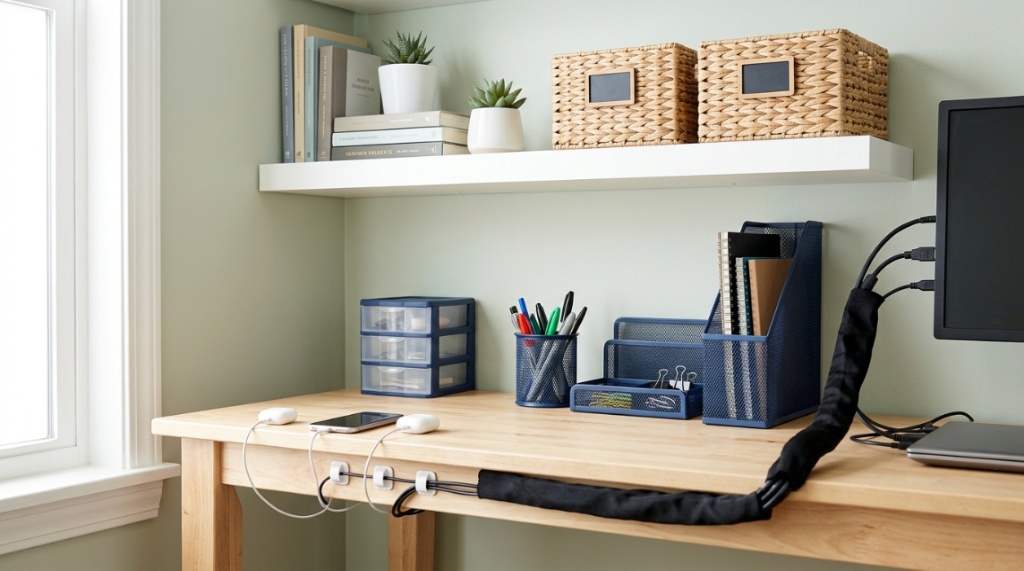
The fastest, cheapest fix is a pack of adhesive cable clips (under $5) that stick to the underside of your desk. Route your monitor, keyboard, and mouse cables along the edge of the desk or down the legs. A power strip with a long cord (six feet or more) should be mounted to the underside of the desk using heavy-duty Velcro strips. This keeps the plugs off the floor and out of sight. For a truly clean look, buy a cable sleeve (a fabric tube that zips up) for about $8 and bundle all your charging cables into one neat snake that runs down the back desk leg. This single ten-minute task transforms a cluttered workbench into a space that feels intentional and polished.
What Lighting Makes a Home Office Look Professional on a Budget?
Layer three types of light: ambient, task, and accent. You do not need designer fixtures to achieve this. A simple floor lamp, a clip-on LED arm light, and a desk lamp with a warm bulb can create a studio-quality look for under $60.
Avoid relying solely on overhead ceiling lights. They cast harsh shadows on your face, making you look tired on video calls. Place a floor lamp with a shade that points upward behind your desk to create soft, diffused background light. For your immediate workspace, an adjustable LED task light with a gooseneck arm directs light exactly where you need it and reduces eye strain. For video calls, a small ring light placed directly behind your monitor at eye level costs around $20 and creates a beautiful , soft glow that eliminates shadows under your chin and eyes. Use daylight-balanced bulbs (5000K) to simulate natural light, which keeps you alert and makes your skin look healthy on camera.
Which Storage Solutions Fit a Small Office and a Small Budget?
Vertical storage is your best friend. Floating shelves, over-desk organizers, and utility carts provide maximum storage without taking up any floor space, and they cost far less than a filing cabinet.
Install two floating shelves above your desk for books, notebooks, and decorative items. A simple wooden shelf bracket and a pine board from a hardware store cost about $15 to $20 total. A pegboard on the wall next to your desk holds scissors, pens, headphones, and cables with inexpensive hooks. For floor storage, a simple three-tier utility cart on wheels (under $30) can hold your printer, paper, and office supplies and tucks easily beside your desk. If you need filing space, a small two-drawer vertical file cabinet from a big box store can be found for under $50. The goal is to keep your desk surface clear so your brain does not feel cluttered.
How Do You Accessorize a Home Office Without Overspending?
Accessories should serve a purpose first and look good second. A cork board, a whiteboard, a solid mouse pad, and a single plant are the only accessories you truly need to add personality and function for under $20.
A cork board or a small magnetic dry-erase board (under $15) keeps your daily tasks visible and organized. A large, desk-pad style mouse pad (around $10) protects your desk surface and provides a smooth surface for your mouse. Add one low-maintenance plant like a snake plant or a pothos in a simple terra cotta or ceramic pot. Greenery literally reduces stress and improves air quality. Skip the novelty desk toys and cheap plastic organizers. Thrift stores are goldmines for solid glass jars for pens and vintage brass objects that look expensive. Follow the rule of “one in, one out” to prevent your desk from becoming a landfill of cheap trinkets.
Is a Standing Desk Converter Worth It on a Tight Budget?
Yes, a standing desk converter is the most affordable way to add height variability to your existing desk. It costs between $80 and $150, which is far cheaper than buying a full electric standing desk frame.
A converter sits on top of your current desk and lifts your monitor and keyboard up to standing height using a gas spring mechanism. This gives you the health benefits of alternating between sitting and standing throughout the day. Look for a converter with a gas spring that can handle your monitor’s weight (typically 20 to 30 pounds). Measure your current desk depth to ensure the converter will fit without overlapping the back edge. Brands like Vivo and FlexiSpot offer reliable budget options. Use a timer on your phone to remind you to stand for fifteen minutes every hour. This simple change improves circulation, reduces back pain, and boosts your energy naturally.
Creating a productive workspace at home involves more than just your main desk setup. If you have extra space or are designing a small commercial startup floor alongside your remote workspace, learning to set up a Functional Office Breakroom on a Small Budget ensures your resting hours are just as restorative as your working hours are efficient.
Where Should You Spend Extra Money and Where Can You Save?
Spend your money on the chair and the monitor arm. Save on the desk itself, the lighting, and the storage. This allocation provides the biggest return on investment for your physical health and productivity.
The chair is your primary interface with the workday. A bad chair causes chronic pain. A good chair prevents it. Spend the bulk of your budget here. A monitor arm costs about $30 and frees up desk space while improving ergonomics. It is a small, high-impact purchase. Save on the desk by buying a flat-pack model without drawers. You can always add a small storage cart later. Save on decor by thrifting or using plants. Do not spend money on branded cable organizers or expensive desk mats. A cheap cutting mat from an art supply store makes an excellent, durable desk protector for under $10. Prioritize function over flash, and your office will look professional because it works perfectly.
How Do You Make a Small Room Feel Like a Professional Office?
Use a mirror, a consistent color palette, and strategic lighting to visually expand a small room. These three tricks cost very little but create the illusion of space and organization.
Lean a large mirror (thrifted for under $20) against the wall opposite a window. It doubles the natural light and makes the room feel twice as big. Keep your color palette neutral. Stick to white, gray, black, and one accent color (like green from a plant or a blue painting). This visual calmness tricks your brain into thinking the space is organized and professional. Use the rule of thirds when positioning your desk. Do not shove it against a wall. If possible, pull it forward so you face the room. This creates a clear path behind you and makes the room feel larger. Finally, keep the wall behind your video call background clean. A blank wall or a simple shelf looks far more professional than a cluttered bulletin board.
One of the most effective ways to increase your workspace without buying a larger desk is to choose a corner shape. You can find excellent deals on home office furniture that offers L-shaped designs, giving you the surface area of a much larger desk for the price of a standard one. This single purchase can double your usable work surface and create a dedicated zone for your computer and a separate zone for paperwork, all within a compact corner footprint.
Can You Build a Dual-Monitor Setup Without Breaking the Bank?
Absolutely. The most affordable way to run two monitors is to use a single wall-mounted monitor arm that holds two screens, or to use your laptop as a secondary screen. This costs under $40 for the arm.
Using your laptop screen as a secondary display requires no additional hardware. You simply extend your desktop display to your external monitor. This gives you a dual-screen setup effectively for free. If you have two full-size monitors, a dual monitor arm is your best budget option. It eliminates the need for two separate monitor stands, which saves desk space and improves ergonomics. Look for a gas spring arm that supports your monitor size and weight. Older, smaller monitors are often perfectly functional and can be bought secondhand on Facebook Marketplace for $30 to $50, making a dual-monitor setup achievable for under $100 total.
Frequently Asked Questions
What is the cheapest way to get a standing desk?
The cheapest way to get a standing desk is to buy a standing desk converter that sits on top of your existing desk. You can find basic models for around $80, which is significantly cheaper than buying a full electric or crank standing desk.
How much should I spend on a home office desk?
You should plan to spend between $100 and $250 for a quality, durable desk. This range typically gets you a solid MDF or wood desk with a steel frame that will last for years. Spending less often results in wobbly, unstable furniture.
Do I need a separate router for my home office?
You do not necessarily need a separate router, but a wired Ethernet connection is far more reliable than Wi-Fi for video calls and large file transfers. A simple 25-foot Ethernet cable costs under $10 and provides a massive stability upgrade for your internet connection.
Is it cheaper to build or buy home office furniture?
It is almost always cheaper to buy budget flat-pack furniture than to build a piece from scratch. Lumber and hardware costs for a custom build typically exceed the price of a similar-quality store-bought desk unless you already own professional woodworking tools.
What color desk is best for a small office?
A white or light wood desk is best for a small office. Light colors reflect more light, making the room feel larger and brighter. Dark desks absorb light and can make a small space feel closed in and oppressive.
How long does it take to assemble a budget desk?
Most budget desks take between one and two hours to assemble. L-shaped desks with multiple legs and supports can take up to three hours. Always have a Phillips head screwdriver and a small rubber mallet on hand, as these tools are not always included.
Can a home office be tax deductible?
Yes, if you are self-employed or a freelancer, you may be able to deduct the cost of your home office furniture and equipment. You typically need to use the space exclusively and regularly for business. Consult a tax professional to determine your specific eligibility.
